How to Get Your Products on Google Shopping is a comprehensive guide designed to empower online retailers with the knowledge and tools necessary to successfully navigate the Google Shopping landscape. As the digital marketplace continues to expand, understanding the nuances of Google Shopping can significantly enhance your product visibility and sales potential. This guide will walk you through every essential step, from setting up your Google Merchant Center account to optimizing your product listings and effectively managing your shopping campaigns.
Delving into the specifics, we will explore the unique features of Google Shopping, the creation of a product feed, and strategies for optimizing listings to attract potential customers. By following this structured approach, merchants can leverage the full capabilities of Google Shopping and drive more traffic to their online stores.
Understanding Google Shopping
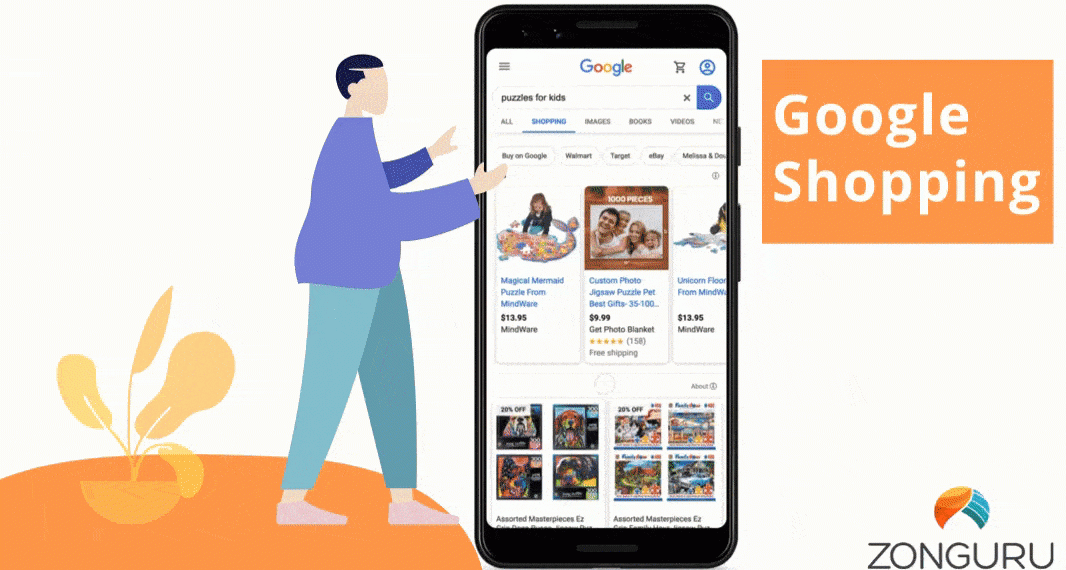
Google Shopping serves as a powerful platform designed to enhance the visibility of online retail products, allowing retailers to showcase their offerings directly to potential customers. The service acts as a bridge between consumers and retailers, enabling users to discover a wide array of products while providing retailers with a unique opportunity to increase traffic and sales. Additionally, Google Shopping’s intuitive interface simplifies the buying process, offering a streamlined experience for both shoppers and sellers.Google Shopping distinguishes itself from traditional search results by featuring a visually engaging format that highlights product images, prices, and store names at the forefront of the search interface.
The primary focus is on product discovery rather than general web pages, making it easier for users to compare items and make informed purchasing decisions. In contrast, traditional search results often prioritize content-rich pages and links that may require additional navigation to find specific products.
Display of Products in Google Shopping
Products showcased in Google Shopping are presented in a visually appealing manner that emphasizes essential information. The display typically includes product images, prices, product titles, promotional offers, and the name of the retailer. This layout is designed to attract consumer attention and facilitate quick comparisons.Key elements of product display in Google Shopping include:
- Images: High-quality, clear images that represent the product effectively, providing potential buyers with a visual understanding of what they are purchasing.
- Pricing Information: Clear and prominent pricing details, often including any discounts or promotions to entice buyers.
- Store Name: The name of the retailer is displayed, enhancing brand recognition and trust among consumers.
- Product Ratings: Star ratings from previous customers may be included, allowing new shoppers to gauge product quality based on peer feedback.
The arrangement of products can be influenced by various factors including relevance to the search query, bidding strategies by retailers, and product feed quality. Retailers are encouraged to optimize their product listings to ensure they stand out in this competitive marketplace. Engaging visuals and accurate information can significantly impact click-through rates and conversion rates, thereby enhancing overall sales performance.
“Optimizing product listings in Google Shopping is essential for maximizing visibility and attracting potential customers.”
Setting Up Google Merchant Center
Establishing a Google Merchant Center account is a crucial step for businesses aiming to promote their products through Google Shopping. This platform enables merchants to manage their product listings and ensure they reach potential customers effectively. By following a systematic approach to setting up your account, you can streamline your product visibility and drive traffic to your online store.To create a Google Merchant Center account, you need to follow a series of straightforward steps that involve providing essential business information, linking your website, and ensuring compliance with Google’s policies.
This process lays the foundation for successful product advertising and visibility across Google services.
Steps to Create a Google Merchant Center Account
Begin by gathering the necessary information and follow these essential steps to establish your account:
- Visit the Google Merchant Center website and click on “Get Started” to initiate the registration process.
- Sign in with your Google account or create a new one if you do not have an existing account.
- Fill in the required business information, including your business name, country, and time zone.
- Agree to the terms and conditions presented during the setup process.
- Verify your business information by providing your website URL, which allows Google to confirm your online presence.
Upon completing these steps, you will have your Google Merchant Center account set up and ready for further configuration.
Importance of Verifying and Claiming Your Website
Verifying and claiming your website is an essential aspect of setting up your Google Merchant Center account. This step ensures that you have ownership of your website, enabling you to manage how your products are displayed on Google. Verifying your website adds credibility to your account and helps prevent unauthorized use of your listings.To verify your website, you can use various methods, such as adding a specific HTML tag to your site’s code, uploading an HTML file to your website, or using Google Analytics.
Once verified, claiming your website allows you to access additional features within Google Merchant Center, such as enhanced reporting and performance insights.
Required Product Data Formats for Google Merchant Center
When submitting product information to Google Merchant Center, adhering to specific data formats is imperative. Utilizing the correct formats ensures your products are displayed accurately and meet Google’s advertising policies. Below is a checklist of the essential product data formats required:
Product Title
A concise and informative title that clearly describes the product.
Description
A detailed description highlighting features, benefits, and specifications of the product.
Product Image
High-quality images that represent the product clearly from multiple angles.
Price
The selling price of the product, formatted correctly according to currency standards.
Availability
Information on whether the product is in stock, out of stock, or available for pre-order.
Link
A direct URL to the product page on your website.
Brand
The brand name of the product, if applicable.
GTIN (Global Trade Item Number)
An identifier for the product, such as UPC or EAN.These elements are crucial for ensuring that your product listings are not only compliant with Google’s requirements but also appealing to potential customers, ultimately enhancing your visibility on the platform.
Creating a Product Feed

Creating a product feed is a crucial step in getting your products listed on Google Shopping. This feed contains essential information about your products that Google uses to display them in relevant searches. A well-structured product feed enhances visibility and can significantly impact sales performance.There are several formats available for product feeds, with XML and CSV being the most common.
Choosing the right format is vital, as it can affect how easily you can manage and update your product data. Below is a step-by-step guide on how to create a product data feed, along with the specifics of different formats and an example of a structured feed.
Step-by-Step Guide to Creating a Product Data Feed
To effectively create a product data feed, follow these steps:
- Identify your product information: Gather all necessary details about your products, such as titles, descriptions, prices, images, availability, and identifiers (like SKU or UPC).
- Choose the format: Decide between XML, CSV, or other options based on your technical capabilities and the volume of your product listings.
- Structure your data: Create a structured layout for your product information, ensuring that all required fields are included according to Google’s specifications.
- Populate the feed: Fill in your product information accurately, ensuring there are no errors or missing data that could lead to disapproval.
- Validate your feed: Use validation tools to check for errors and ensure compliance with Google’s product feed requirements.
- Upload the feed to Google Merchant Center: Once validated, upload your feed to Google Merchant Center for processing.
Formats for Product Feeds
Several formats can be used for product feeds, with XML and CSV being the most prevalent.
- XML: This format is highly structured and allows for complex data representation. It is suitable for larger inventories and supports nested data structures.
- CSV: A simpler format that is easy to create and edit using spreadsheet software. It is most effective for smaller product inventories with straightforward data requirements.
Example of a Structured Product Feed
To illustrate how a structured product feed looks, here is an example using HTML table tags:
| Product ID | Title | Description | Price | Availability | Image Link |
|---|---|---|---|---|---|
| 12345 | Wireless Headphones | High-quality wireless headphones with noise cancellation. | $99.99 | In Stock | https://example.com/images/headphones.jpg |
| 67890 | Bluetooth Speaker | Portable Bluetooth speaker with 12 hours of battery life. | $49.99 | Out of Stock | https://example.com/images/speaker.jpg |
The above table represents a simple yet effective structure for a product feed. Each product is clearly defined with essential attributes, making it easy for Google and potential customers to understand the offerings.
Optimizing Product Listings
Optimizing product listings is essential for enhancing visibility and increasing sales on Google Shopping. By implementing effective strategies in product titles, descriptions, and images, merchants can significantly improve their performance in this competitive marketplace. This section discusses best practices for writing compelling product titles and descriptions, the importance of high-quality images, and common mistakes to avoid.
Best Practices for Writing Product Titles and Descriptions
Creating engaging product titles and descriptions is crucial for catching the attention of potential buyers. A well-crafted title should include the most relevant s, product features, and specifications. Each product description should further elaborate on these aspects, providing detailed information that helps consumers make informed purchasing decisions. Key practices include:
- Incorporating s: Use relevant s that consumers are likely to search for. Titles should ideally contain the brand name, product type, and key features.
- Be Descriptive and Concise: Ensure descriptions are thorough yet succinct. Highlight important attributes, such as size, color, and material, while avoiding unnecessary jargon.
- Utilize Bullet Points: Where applicable, use bullet points in descriptions to break down features and benefits for easier readability.
- Maintain Consistency: Use a consistent format across all product listings to enhance professionalism and trustworthiness.
Importance of High-Quality Images
High-quality images play a pivotal role in attracting customers and facilitating purchases on Google Shopping. Clear, visually appealing images can significantly influence a buyer’s decision-making process. Consider the following aspects when optimizing product images:
- Image Resolution: Use high-resolution images that showcase products clearly. A minimum of 800×800 pixels is recommended.
- Multiple Angles: Provide images from various angles to give potential buyers a comprehensive view of the product.
- Contextual Images: Include images that show the product in use or in a relevant setting. This helps customers visualize the product in their own lives.
- Proper Formatting: Ensure images are in the appropriate format (JPEG or PNG) and comply with Google’s image guidelines, such as avoiding overlays or watermarks.
Common Mistakes to Avoid in Product Listings
When creating product listings, there are several pitfalls that merchants should avoid to ensure effective marketing on Google Shopping. Being aware of these common mistakes can help improve the overall quality of listings.Awareness of the following mistakes is crucial:
- Ignoring Product Specifications: Failing to include essential details such as dimensions, weight, or compatibility can lead to customer dissatisfaction.
- Overlooking Practices: Not optimizing product titles and descriptions for search engines can result in reduced visibility.
- Using Stock Images: Relying on generic stock photos instead of original product images may diminish trust and credibility.
- Inconsistent Product Information: Discrepancies between product descriptions, titles, and images can confuse customers and lead to abandoned carts.
Effective optimization of product listings on Google Shopping can lead to improved visibility, increased customer engagement, and ultimately, higher sales.
Setting Up Shopping Campaigns
Creating effective shopping campaigns within Google Ads is essential for maximizing the visibility and sales of your products. This process involves several key steps, including establishing a Google Ads account, configuring your budget, and selecting the appropriate bidding strategy to optimize your campaign’s performance.
Creating a Google Ads Account
To begin with, you need to create a Google Ads account specifically for your shopping campaigns. The steps involved are straightforward:
- Visit the Google Ads website and click on “Start Now.”
- Sign in with your Google account or create a new one if needed.
- Choose your advertising goal; for shopping campaigns, select “Sales” or “Leads.”
- Input your business information and select your time zone and currency.
- Set up your first campaign, choosing “Shopping” as the campaign type.
Setting up an account correctly is crucial, as this will serve as the foundation for all your advertising efforts.
Setting a Budget and Bidding Strategy
Setting a budget and determining a bidding strategy are vital for managing your advertising expenses effectively. Here’s how you can approach these tasks:
Budgeting
Define a daily budget that reflects the amount you are willing to spend each day on your shopping campaigns. This budget should be based on your overall marketing strategy and sales goals.
Bidding Strategy
Selecting the right bidding strategy can significantly affect your campaign’s success. Google Ads offers several options, including:
- Manual CPC (Cost-Per-Click): You control the maximum amount you’re willing to pay for each click. This strategy offers flexibility but requires ongoing management.
- Enhanced CPC (ECPC): This is an automated option that adjusts your manual bids to maximize conversions while staying within your budget.
- Target ROAS (Return on Ad Spend): This strategy allows you to set a target return on ad spend, and Google will automatically adjust your bids to meet this goal.
- Maximize Clicks: An automatic strategy that aims to get as many clicks as possible within your budget, suitable for increasing traffic.
- Target CPA (Cost-Per-Acquisition): This bidding strategy is aimed at acquiring conversions, setting bids to achieve a specific cost per acquisition.
The choice of bidding strategy should align with your campaign goals, whether that be increased traffic, conversions, or specific return metrics.
Comparison of Bidding Strategies
Understanding the advantages and disadvantages of various bidding strategies can inform your decision-making process. Here is a comparative overview:
| Bidding Strategy | Advantages | Disadvantages |
|---|---|---|
| Manual CPC | Full control over bids; flexibility | Requires constant monitoring and adjustments |
| Enhanced CPC | Improves chances of conversion; automatic adjustments | Less control over individual bids |
| Target ROAS | Focuses on profitability; automated optimization | Requires sufficient historical data |
| Maximize Clicks | Increases traffic quickly; easy to implement | May not focus on conversions |
| Target CPA | Aims for specific cost per conversion; automated | May limit reach if too strict |
Selecting the appropriate bidding strategy can significantly impact your advertising success and budget management in Google Shopping campaigns.
Monitoring Performance
In the competitive realm of e-commerce, tracking the performance of your Google Shopping campaigns is essential for maximizing ROI and ensuring your marketing strategies are effective. By regularly analyzing campaign performance, you can make informed decisions that enhance visibility, drive traffic, and increase sales. This process involves understanding the metrics that matter and implementing adjustments based on insightful data analysis.
Methods for Tracking Campaign Performance
To effectively monitor the performance of your Google Shopping campaigns, consider the following proven methods:
- Google Ads Dashboard: The Google Ads platform provides a comprehensive dashboard that displays key performance indicators (KPIs) such as clicks, impressions, and conversions. Utilize this tool to gain insights into how your campaigns are performing in real time.
- Google Analytics Integration: Linking your Google Merchant Center with Google Analytics allows for deeper analysis of user behavior on your site after they click on your ads. This integration can help you understand which products are driving sales and which ones may need more attention.
- Custom Reports: Create custom reports in Google Ads to focus on specific metrics that align with your business objectives. Tailor these reports to track performance over time or compare different campaigns.
- Automated Rules: Set up automated rules within Google Ads to receive alerts when certain thresholds are met, such as when the cost per acquisition (CPA) exceeds a specified amount. This can prompt timely adjustments to your campaigns.
Key Metrics to Focus On
Assessing the success of your campaigns requires attention to various metrics. The following key performance indicators should be prioritized:
- Click-Through Rate (CTR): This metric indicates the percentage of users who clicked on your ad after seeing it. A high CTR suggests that your product images and descriptions are compelling.
- Conversion Rate: The conversion rate reveals the percentage of clicks that led to a sale. Monitoring this metric helps you determine the effectiveness of your product listings and landing pages.
- Return on Advertising Spend (ROAS): ROAS measures the revenue generated for every dollar spent on advertising. This metric is essential for understanding the profitability of your campaigns.
- Cost Per Click (CPC): Monitoring your CPC allows you to evaluate how much you are paying for each click on your ads. Keeping this cost in check is vital for maintaining profitable campaigns.
Procedures for Making Adjustments Based on Performance Data
Regularly analyzing performance data enables you to make necessary adjustments to your campaigns. Here are effective procedures for optimizing based on insights gained:
- Refining Product Listings: If certain products are underperforming, consider enhancing their titles, descriptions, and images. Adding high-quality images and detailed product descriptions can significantly boost engagement.
- Adjusting Bids: Increase bids on high-performing products to maximize visibility and sales potential, while lowering bids on underperforming items to control costs.
- Segmenting Campaigns: Creating separate campaigns for different product categories or performance levels allows for more tailored strategies. This helps in allocating budget and resources more effectively.
- A/B Testing: Implement A/B testing for different ad copies and product images. This will help you identify which variations resonate best with your audience and drive higher conversions.
Troubleshooting Common Issues
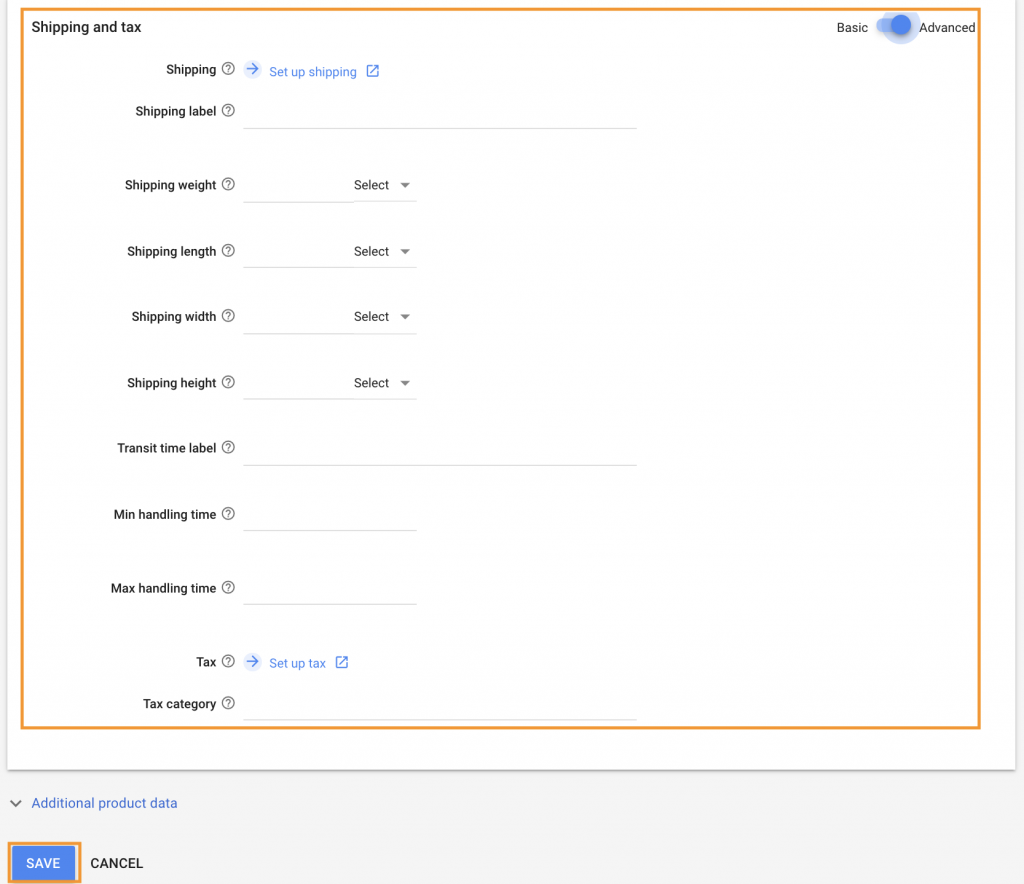
When utilizing Google Shopping, merchants may encounter a variety of challenges that can hinder their success. Understanding these common issues is critical for maintaining a seamless shopping experience and ensuring that products reach potential customers. This section Artikels frequent problems faced by merchants, alongside effective solutions to enhance visibility and compliance within the Google Shopping ecosystem.
Common Issues Faced by Merchants
Merchants often deal with several recurring issues, including product disapprovals and search visibility problems. Addressing these issues promptly can help maintain a positive presence in the competitive online shopping environment. Here are a few common issues:
- Product Disapprovals: Products may be disapproved due to violations of Google’s policies, missing information, or inaccuracies in the product data.
- Products Not Appearing in Search Results: Even approved products may fail to appear in Google Shopping due to issues with campaigns or product feeds.
- Feed Formatting Errors: Incorrect formatting or missing attributes in the product feed can lead to disapprovals or visibility issues.
Resolving Product Disapprovals in Merchant Center
Disapproved products can be a significant barrier for merchants. Understanding the reasons for disapproval is essential to resolving the issue effectively. The following steps Artikel how to address these disapprovals:
1. Check Disapproval Reasons
Navigate to your Google Merchant Center account and review the “Products” section. Disapproved items will have a specific reason listed next to them.
2. Ensure Compliance
Familiarize yourself with Google’s Shopping policies and ensure that your product information adheres to these guidelines. Common reasons include inappropriate content or incorrect pricing.
3. Update Product Information
Make necessary updates to the product’s title, description, images, or other attributes as per the disapproval reason.
4. Resubmit for Review
After making the necessary corrections, resubmit the product for review in your Merchant Center account.
5. Regular Monitoring
Continuously check for product status updates to ensure compliance and prevent future disapprovals.
Steps for Products Not Appearing in Google Shopping Results
If products are not appearing in Google Shopping results despite being approved, merchants should take proactive measures to identify and resolve the underlying issues:
Inspect Campaign Settings
Verify that the products are included in active campaigns. Ensure that the campaign status is “enabled” and review the targeting settings.
Review Product Feed Data
Ensure that all required attributes are correctly filled in the product feed, including GTINs, brand names, and product types. Missing or incorrect data can lead to visibility issues.
Check Exclusion Lists
Confirm that products are not inadvertently included in any exclusion lists that may prevent them from being shown in Google Shopping.
Analyze Performance Data
Utilize the “Performance” tab in Google Merchant Center to analyze how your products are performing. Look for any trends or anomalies that could indicate underlying problems.
Consult Google Support
If issues persist after checking all settings and compliance, reaching out to Google Merchant Center support can provide additional assistance and guidance tailored to your specific situation.By systematically addressing these common issues, merchants can enhance their presence on Google Shopping, ensuring that their products reach the desired audience effectively.
Advanced Tips for Success
To excel in Google Shopping, implementing advanced strategies can significantly enhance your product visibility and sales potential. Leveraging customer reviews, utilizing promotions effectively, and employing seasonal marketing strategies are critical components of a successful Google Shopping campaign.
Leveraging Customer Reviews
Customer reviews play a pivotal role in building trust and credibility with potential buyers. Positive reviews can improve your product’s visibility and click-through rates on Google Shopping. To maximize their impact, consider the following strategies:
- Encourage Reviews: Actively ask satisfied customers to leave reviews after their purchase. Follow up with personalized emails encouraging feedback and highlighting the importance of customer opinions.
- Showcase Reviews: Highlight positive reviews directly within your product listings. This can include using structured data to display star ratings and review snippets in your listings.
- Respond to Feedback: Engage with customers by responding to reviews, whether positive or negative. This demonstrates your commitment to customer satisfaction and can influence potential buyers positively.
- Utilize Review Aggregators: Consider using third-party review services that integrate with Google Merchant Center to ensure your reviews are visible and reputable.
Utilizing Promotions and Special Offers
Promotions and special offers can attract attention and encourage conversions on Google Shopping. Implementing effective promotional strategies can lead to increased sales and customer engagement. Here are some essential tips:
- Create Time-Sensitive Offers: Limited-time promotions can create urgency. Highlight discounts or special offers prominently to encourage immediate action from potential buyers.
- Utilize Google Merchant Promotions: Take advantage of Google’s Merchant Promotions feature, which allows you to display promotional offerings directly in your product listings, increasing visibility.
- Bundle Products: Consider offering bundle deals where customers can purchase multiple items at a discount. This strategy not only boosts average order value but also provides perceived savings to customers.
- Highlight Free Shipping: Free shipping promotions are appealing to many shoppers. Clearly display shipping offers in your product ads to enhance customer interest and reduce cart abandonment.
Seasonal Marketing Strategies
Seasonal marketing can provide a significant boost to your Google Shopping performance by aligning product promotions with shopping trends. Implementing targeted seasonal strategies is essential for capitalizing on heightened consumer interest during specific times of the year. Consider these approaches:
- Adjust Your Product Feed: Tailor your product listings to emphasize seasonal items or relevant themes, such as holiday decorations or summer apparel, ensuring they are front and center during peak shopping periods.
- Plan Promotional Calendars: Create a calendar detailing key shopping seasons, holidays, and events. Plan your campaigns and promotions around these dates to maximize visibility and sales opportunities.
- Leverage Seasonal s: Update your product titles and descriptions to include seasonal s that align with consumer searches during specific times of the year, enhancing discoverability.
- Utilize Social Media Integration: Promote your seasonal offers on social media platforms to drive traffic to your Google Shopping listings, creating a cohesive marketing strategy that spans multiple channels.
Summary
In conclusion, mastering the process of getting your products on Google Shopping is not just about listing items; it is a strategic endeavor that requires careful planning and execution. By understanding the platform, optimizing your listings, and monitoring performance, you position your business for greater visibility and success in a competitive online environment. Embrace the insights shared in this guide, and you will be well on your way to transforming your Google Shopping experience into a fruitful venture.